
H3 Image

H3 Image でテキストから画像生成 プロンプトから 1K・2K・4K の画像に

情景やポスター、メニューを文章で書けば、MiniMax H3 Image がテキストから画像を作ります。

  • 1K・2K・4K、約1〜16メガピクセル
  • H3 のテキストから画像、比率は10種類
  • プロンプトは最大5,000文字
  • H3 Image の 1K 画像を5枚無料で
0
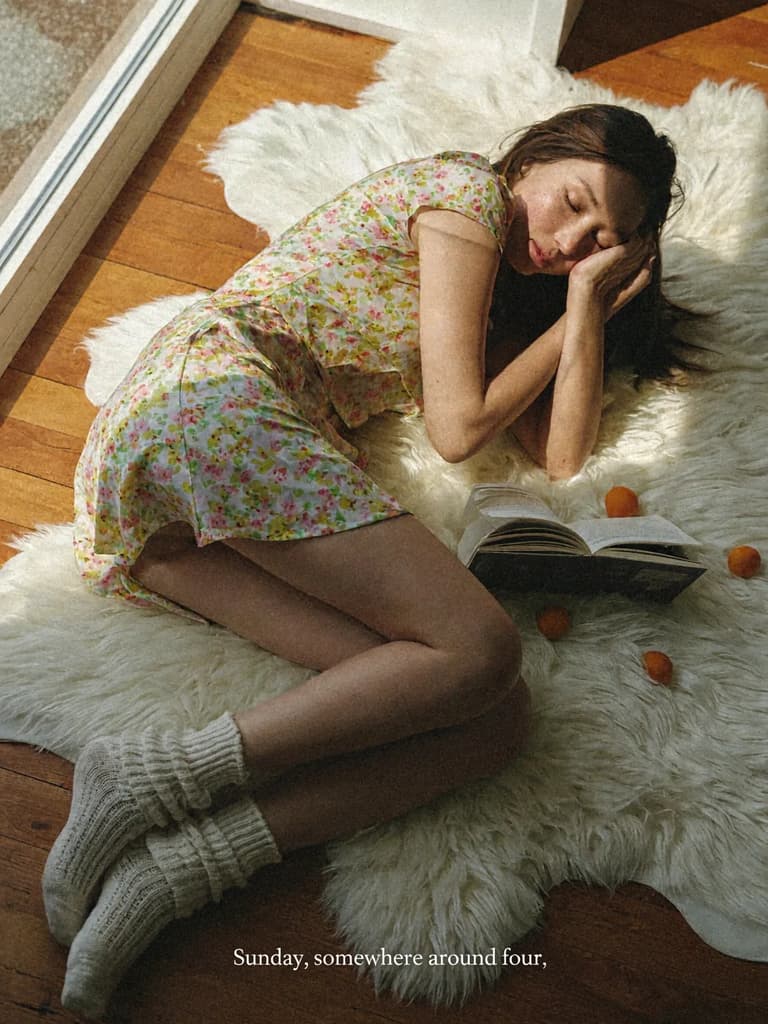
A woman lying on a sheepskin rug in warm afternoon window light
プロンプト

A casual phone photo of a woman in her mid-twenties lying back on a white sheepskin rug on a wooden floor beside a sunny window. Long dark hair spread out, one hand resting against her cheek, eyes half closed. She wears a short-sleeved floral summer dress and slouchy cream knit socks. Open paperback books and a few ripe apricots lie on the rug around her. Warm, hard late-afternoon sunlight falls across her in a sharp diagonal, with deep soft shadows. Shot from slightly above, natural skin texture with freckles, light film grain, faded warm colors. A small white serif caption along the bottom edge reads: "Sunday, somewhere around four."

テキストから画像の作例

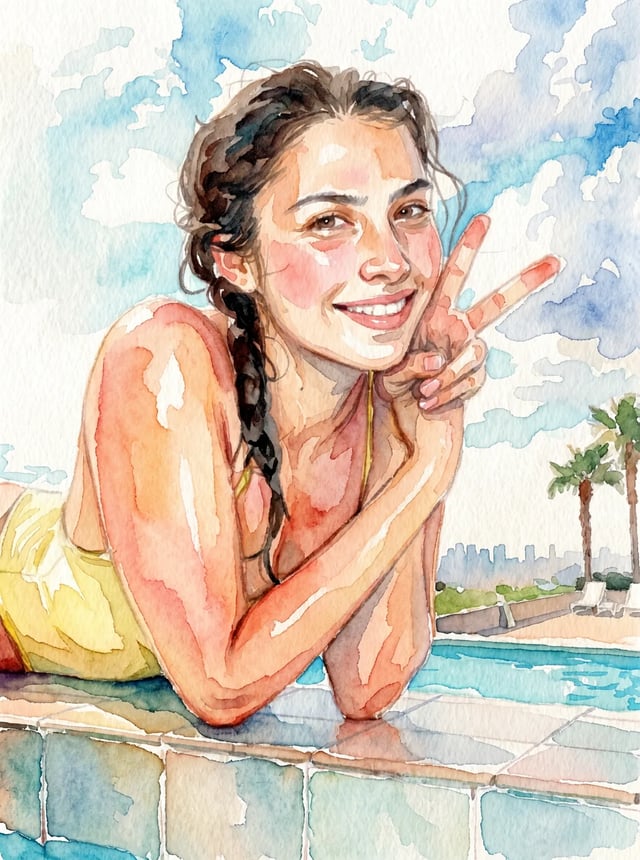
  • H3 Image

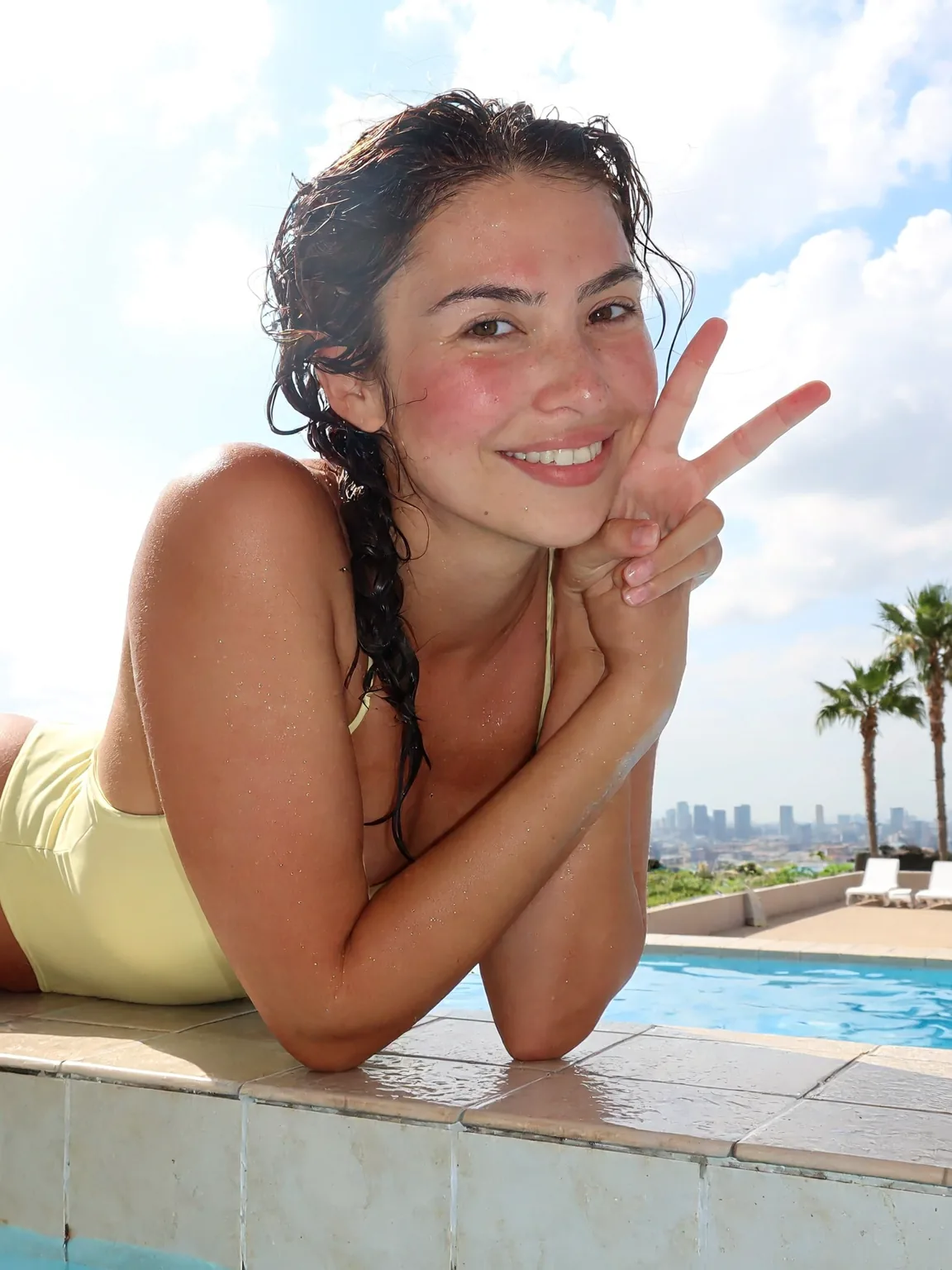
    A bright phone snapshot of a smiling woman in her mid-twenties leaning on the tiled edge of a rooftop swimming pool, arms folded on the edge, one hand making a peace sign near her face. Wet dark hair in a loose braid over one shoulder, a pale yellow one-piece swimsuit, water droplets on her skin and a light sunburn blush on her cheeks. Behind her: blue pool water, white sun loungers, two palm trees and a hazy city skyline under a cloudy summer sky. Midday sun, slightly overexposed highlights, eye-level framing a little off center, natural skin texture, casual and happy.

  • H3 Image

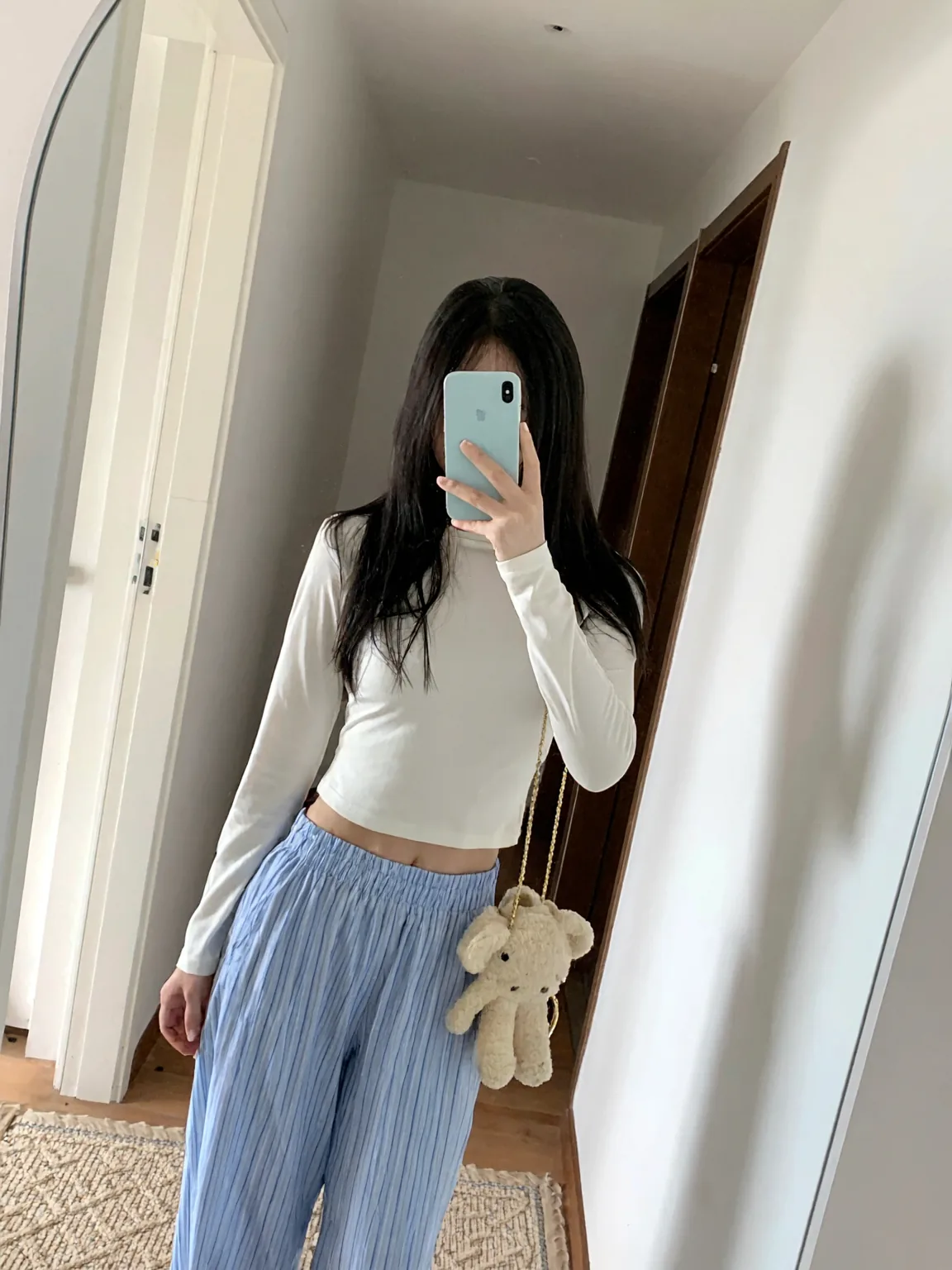
    A mirror selfie in a minimal apartment hallway: a young woman in her twenties holds a pale blue phone in front of her face so her face is hidden, long straight black hair falling past her shoulders. She wears a fitted white long-sleeve cropped top, light blue striped pajama pants and a small cream teddy-bear bag on a thin gold chain over her shoulder. Soft daylight from a doorway on the left, a white wall and a dark wooden door frame behind her. Slightly tilted vertical framing, phone camera look, true-to-life colors.

  • H3 Image

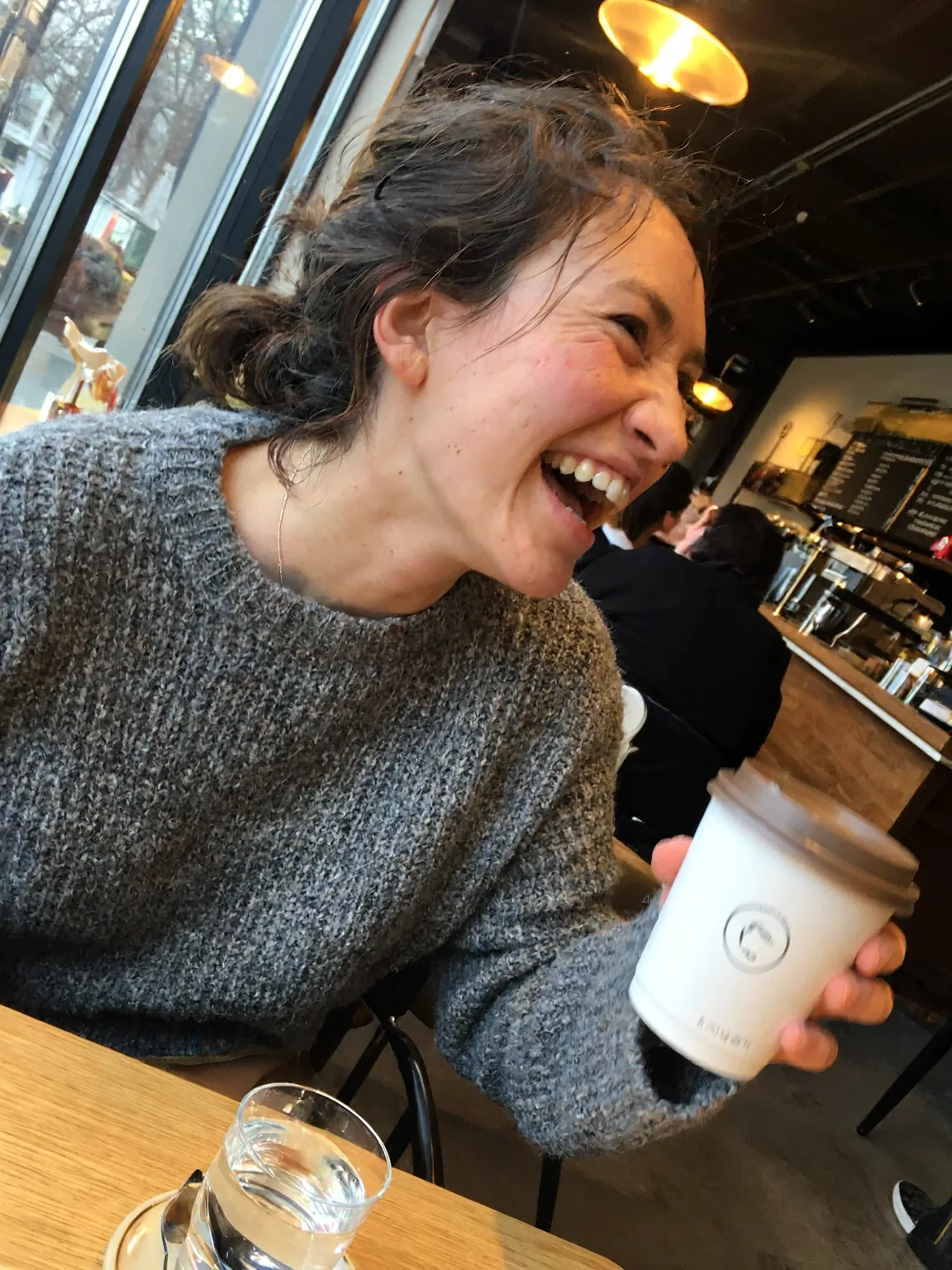
    An ordinary phone photo taken by a friend across the table in a busy cafe: a woman in her late twenties with messy dark hair and a gray knit sweater, mid-laugh, holding a paper coffee cup. Eye level, slightly tilted framing, her face a little off center. Mixed light from the window and warm ceiling bulbs, a bit of motion blur on her hand, other customers soft in the background. No studio lighting, no retouching, visible skin texture.

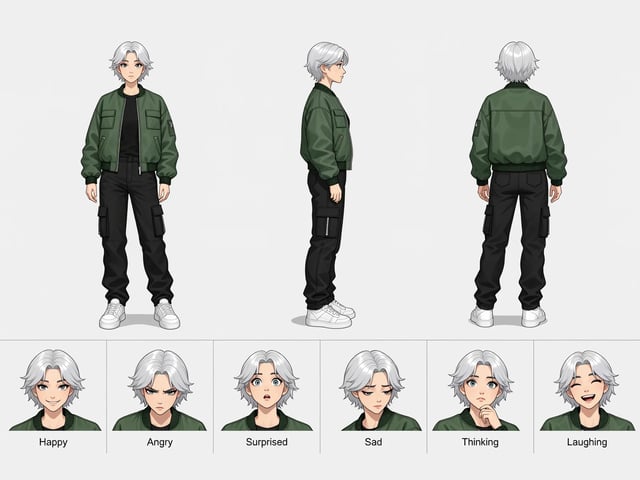
  • H3 Image

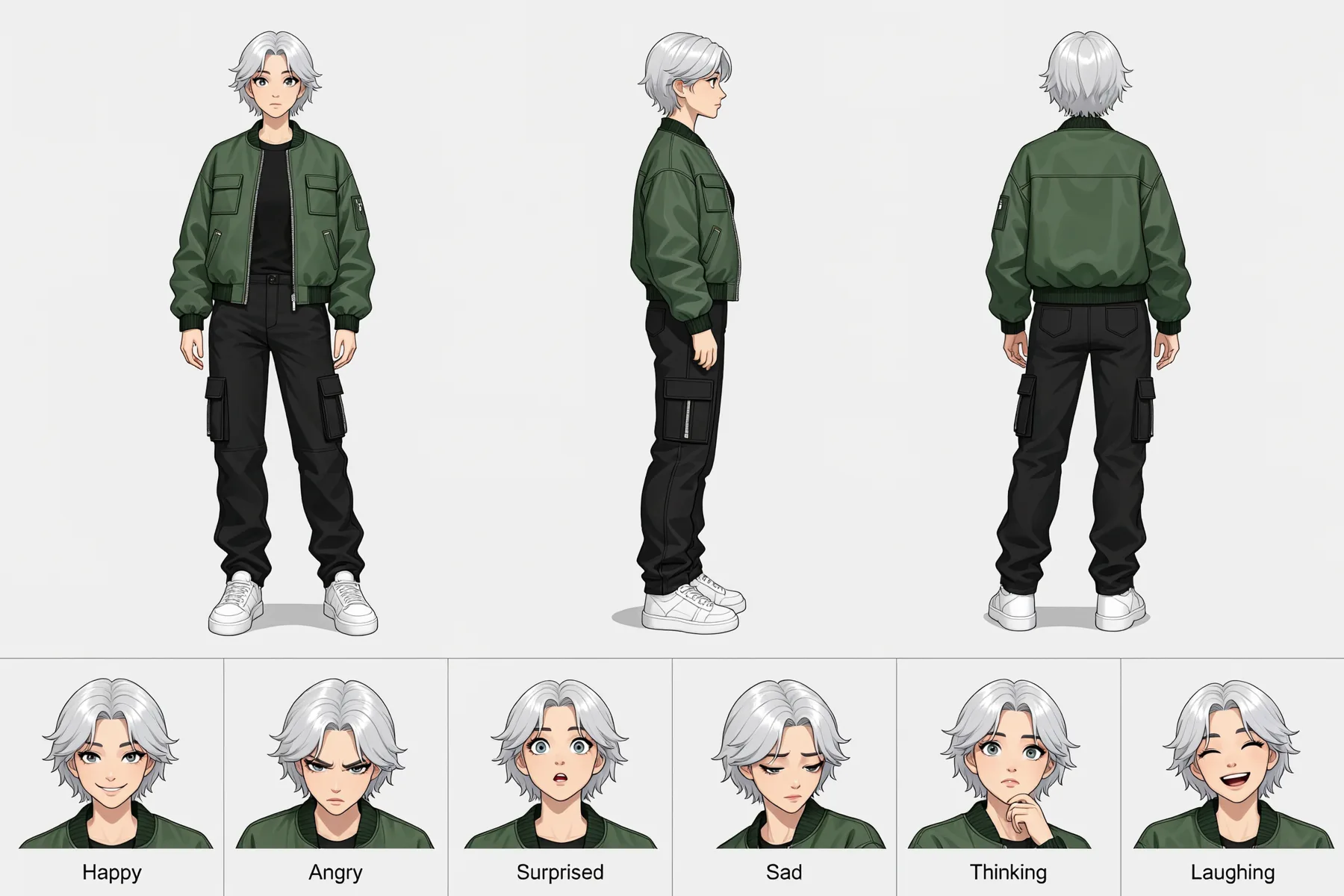
    Character reference sheet of one young woman with short silver hair, a green bomber jacket, black cargo pants and white sneakers. Top row: full-body front view, side view and back view in the same neutral pose, evenly spaced on a plain light gray background. Bottom row: six head-and-shoulder close-ups with different expressions, labeled Happy, Angry, Surprised, Sad, Thinking and Laughing. Clean digital illustration, flat even lighting, the same proportions and colors in every view.

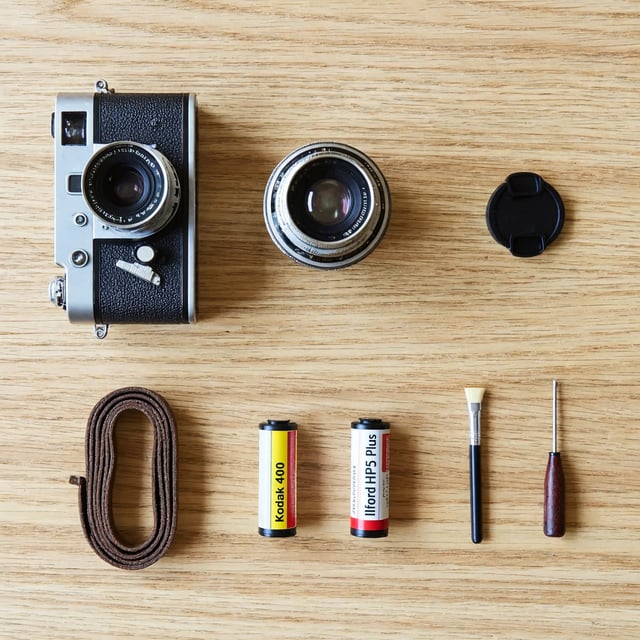
  • H3 Image

    Knolling photo shot from directly above: a vintage film camera taken apart into its body, lens, lens cap, strap, two film rolls, a cleaning brush and a small screwdriver, all laid out at right angles with even gaps on a pale oak table. Soft daylight from a window on the left, gentle shadows, every object fully visible and none overlapping. Sharp focus from edge to edge, natural colors.

概要

H3 Image のテキストから画像生成の要点

上の H3 Image の生成ツールが、プロンプトから画像を作るときの仕様です。2026年11月16日に確認しました。

モデル
MiniMax H3 Image(最初から選択済み)
モデルメニューでは「H3 Image」と表示されます。
サイズ
1K・2K・4K
それぞれ約1・4・16メガピクセル。
アスペクト比
1:1〜21:9 の10種類
1:1、4:5、5:4、3:4、4:3、2:3、3:2、9:16、16:9、21:9。
プロンプトの長さ
最大5,000文字
英語または中国語。
プロンプトの書き直し
常にオン
描く前にプロンプトが詳しい情景描写に書き直されるため、毎回ちがう画像になります。
ネガティブプロンプト
なし
画像に入れたいものを書きます。
1回の生成枚数
1〜4枚
無料で試す
できます。1K で5枚
登録は無料。2K と 4K には有料プランか追加購入が必要です。
透かし
無料で作った画像のみ
準備
不要。ブラウザで動きます

MiniMax H3 Image のモデルカード

サイズ比較

1K・2K・4K:同じプロンプトを3つのサイズで

MiniMax は、いちばんよい仕上がりを得るには 4K を勧めています。同じプロンプトを3つのサイズで生成し、同じ小さな手書きカードを拡大して並べました。画素数を増やすと何が変わるのか、大きいサイズを選ぶ前に確かめられます。2026年11月16日に各サイズ1回ずつ生成し、1枚目をそのまま載せています。書き直しで通りの配置が毎回変わるため、拡大部分はどれも同じカードを中心に、画像全体に対して同じ割合の範囲を切り出しています。

全サイズ共通のプロンプト(実際に使った英語の原文)

A photograph for a travel guide: a narrow side street in an old harbour town just after evening rain, seen from the middle of the street at eye level. On the left, a small bakery with a dark green awning; gold serif letters on its window read "Marlow & Daughters", and a small handwritten card in the window reads "Fresh bread from 7am". On the right, a bicycle repair shop with a hanging metal sign that reads "Pell Street Cycles" and three bicycles leaning against the brick wall. In the middle distance, a corner cafe with a small red neon sign that reads "OPEN". Wet cobblestones reflect the warm shop lights; a few puddles, a parked pale blue scooter, string lights crossing above the street and potted herbs by the doorways. Blue dusk sky, warm yellow window light, fine detail in the brick, wood grain and wet stone. Natural colors, realistic photo, sharp focus from front to back.

大きな「Pell Street Cycles」の看板は、どのサイズでも正確です。見てほしいのは、パン屋の窓と奥にある赤い「OPEN」のネオンです。

  • 1K

    約1メガピクセル · 1248 × 832

    パン屋の店名は読みにくく、「OPEN」はぐにゃぐにゃの線に。自転車は4台が絡み合っています。1K はアイデアや構図を試すのに向いています。

  • 2K

    約4メガピクセル · 2496 × 1664

    すっきりした仕上がりで「Marlow & Daughters」も正確ですが、小さなカードと「OPEN」はまだ崩れています。大事な文字が大きく入るなら 2K で足ります。

  • 4K

    約16メガピクセル · 5024 × 3360(縮小表示)
    小さな文字まで正確

    小さなカードやネオンまで、看板の文字はすべて正確。拡大しても質感がくっきりしています。ただし、パン屋の店名を2回描いていました。小さな文字や細かな質感まで崩したくないなら 4K を。

文字入れテスト

ポスター・メニュー・グラフ:文字を正確に入れる

画像に入れたい文字は、一字一句そのまま引用符(" ")で囲み、どこにどの大きさで置くかも書きます。2026年11月16日に各プロンプトを 2K で1回ずつ生成し、文字をプロンプトと一つずつ照らし合わせました。ポスターとメニューは一字一句正確。グラフはラベルこそすべて正確でしたが、棒の高さはおおよそでした。

見出しと日付入りのライブポスター

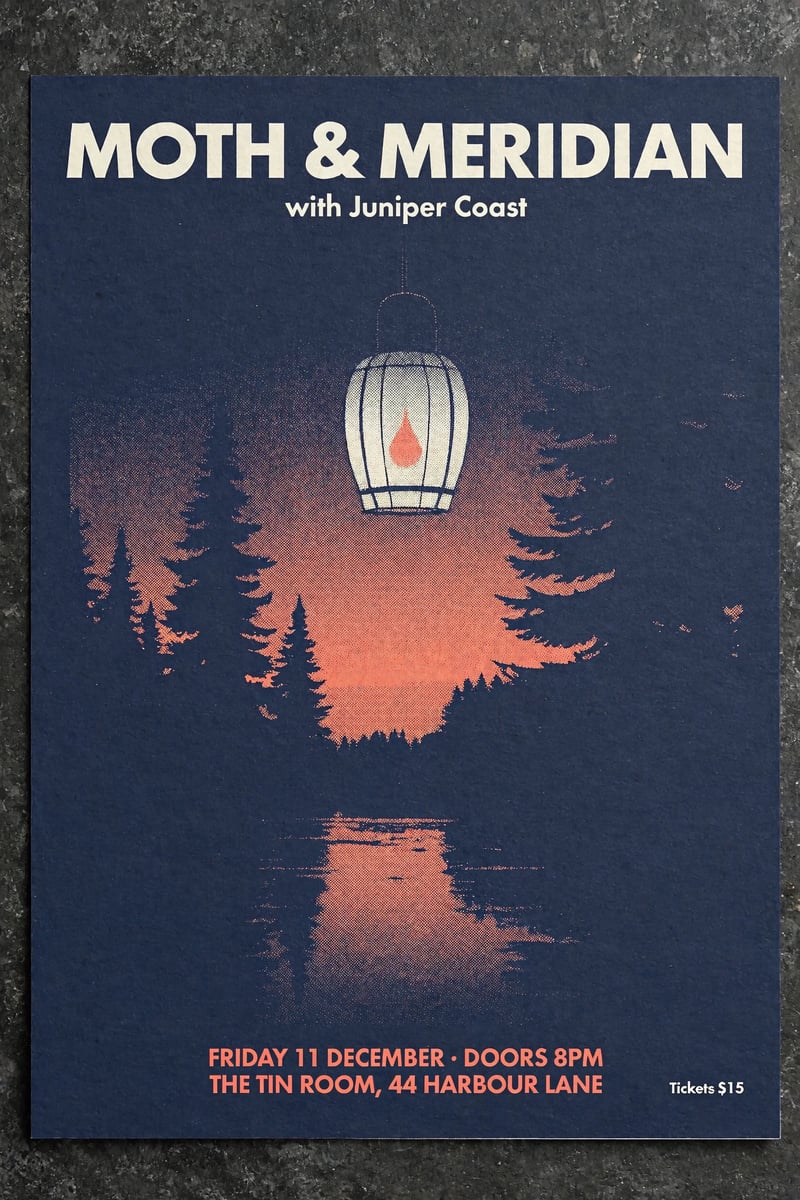
5行すべて綴りが正確で、中黒(·)やカンマまで合っています。プロンプトでは上から順にレイアウトを示し、各行を大きさと色つきで引用符に入れ、最後を「No other text on the poster」(ポスターにほかの文字は入れない)で締めています。バンド名と会場は架空のものです。

実際に使った英語のプロンプト(2K・2:3)

A printed gig poster for a small indie concert, portrait. Layout from top to bottom: a big headline across the top third, an illustration in the middle, two lines of details at the bottom. The headline reads "MOTH & MERIDIAN" in heavy condensed cream capitals. Directly under it, smaller cream text reads "with Juniper Coast". The middle illustration is a screen print of a paper lantern floating above a dark lake with pine trees, in three inks only: cream, coral and deep navy, with visible halftone grain. At the bottom, centered on two lines in coral capitals: "FRIDAY 11 DECEMBER · DOORS 8PM" and "THE TIN ROOM, 44 HARBOUR LANE". In the bottom right corner, small cream text reads "Tickets $15". Flat matte paper with slight ink misregistration. No other text on the poster.

正確
引用符で囲んだすべての行が、指定どおりの位置と色で入りました。
要確認
見出しは字幅を詰めた書体(コンデンス)になっておらず、ポスターは石の上に置かれた写真になりました。平面のデザインにしたいなら「a flat poster design filling the whole frame」と指定します。
生成ツールで試す
H3 Image で作った MOTH & MERIDIAN のライブポスター。紺・コーラル・クリーム色で、松林の湖の上に紙のランタン、下に日付と会場

5品を載せたカフェのメニューボード

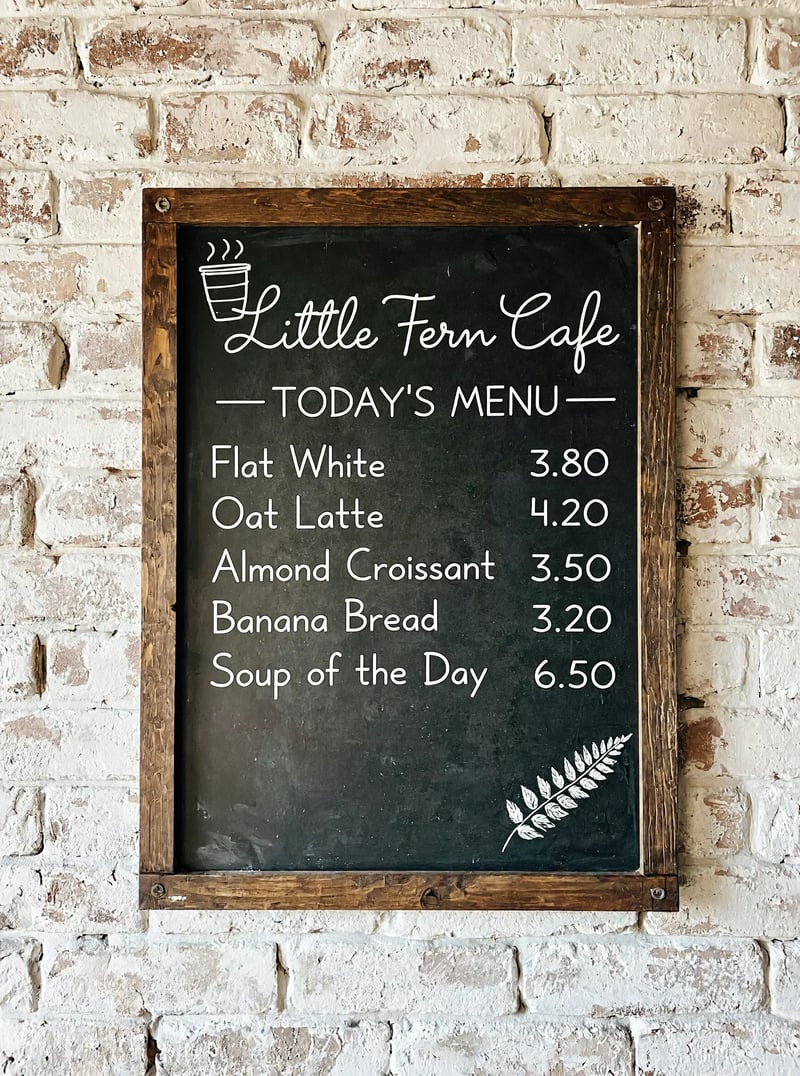
品名も価格もすべて正確で、きれいにそろい、アポストロフィも残っています。「Oat Latte 4.20」のように品名と価格を1組にして引用符に入れると、価格が別の品にずれません。価格は架空の例です。

実際に使った英語のプロンプト(2K・3:4)

A straight-on photo of a cafe chalkboard menu in a wooden frame hanging on a whitewashed brick wall. At the top, large white chalk script reads "Little Fern Cafe". Below it, a heading in chalk capitals reads "TODAY'S MENU". Under the heading, five lines in neat white chalk lettering, each with the item on the left and the price on the right: "Flat White 3.80", "Oat Latte 4.20", "Almond Croissant 3.50", "Banana Bread 3.20", "Soup of the Day 6.50". Small chalk drawings of a coffee cup in the top left corner and a fern leaf in the bottom right corner. Soft morning light from the left, a little chalk dust on the board, realistic photo. No other text on the board.

正確
7行すべてと、隅の2つのイラスト。
要確認
文字が手書きではなく、印刷したように見えます。もっとラフな手書きにしたいなら、チョークの線にむらを出すよう指定します。
生成ツールで試す
白く塗ったレンガ壁に掛かる木枠の Little Fern Cafe の黒板メニュー。価格付きの5品とシダの絵

正確な数値入りの棒グラフ

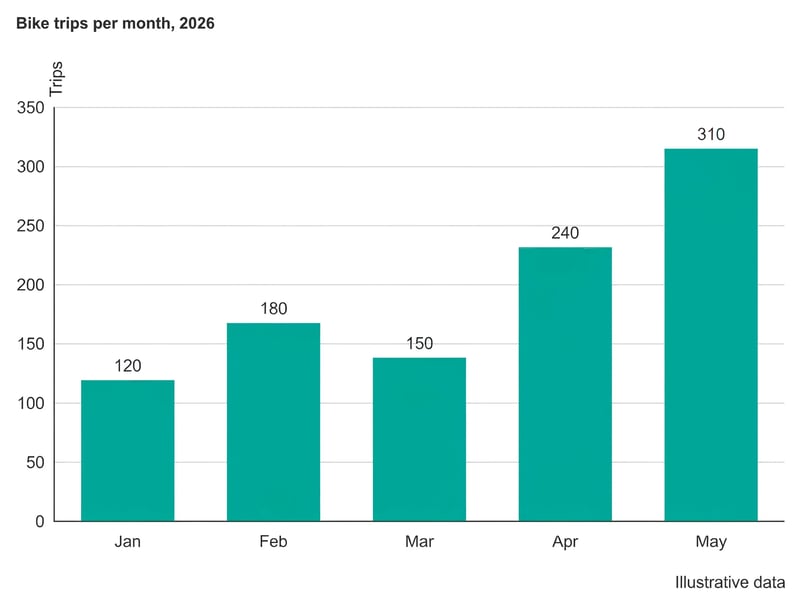
グラフに書かれた文字と数字はすべて正確です。ただ、棒の高さはおおよそでした。目盛り線で測ると、2月は180のところ約167、3月は150のところ138、4月は240のところ231、5月は310のところ315です。スライドなら十分ですが、正確な棒が必要ならグラフ作成ツールを使ってください。

実際に使った英語のプロンプト(2K・4:3)

A clean flat bar chart for a report slide, white background. Title at the top left in bold dark gray sans-serif reads "Bike trips per month, 2026". Five vertical teal bars, evenly spaced, with these labels under them from left to right: "Jan", "Feb", "Mar", "Apr", "May". The value is written above each bar: "120", "180", "150", "240", "310". Bar heights match the values on a y-axis from 0 to 350 with light gray gridlines and tick labels at 0, 50, 100, 150, 200, 250, 300 and 350. The y-axis title reads "Trips". A small gray note at the bottom right reads "Illustrative data". No other text in the image.

正確
すべてのラベルと数値、「Illustrative data」(説明用のデータ)の注記。
要確認
軸の目盛りに対する棒の高さ。
生成ツールで試す
「Bike trips per month, 2026」というタイトルの青緑の棒グラフ。1月から5月までの5本の棒の上に数値
プロンプトの型

H3 Image の長いプロンプトの書き方

MiniMax H3 Image でテキストから画像を作るなら、H3 Image のプロンプトはキーワードの羅列より、絵全体を説明する文章にしたほうがうまくいきます。MiniMax がモデルと一緒に GitHub で公開しているプロンプトの書き方ガイドでは、何のための絵か、レイアウト、誰が・何が写っているか、見た目、入れる文字すべて、の順に並べています。静止画を作るときの MiniMax H3 のプロンプトの書き方は、ひとことで言えばこれです。

長くてもかまいません。入力欄には5,000文字まで入り、上のプロンプトは600〜900文字です。短くても大丈夫です。生成ツールが詳しい情景に書き直してくれるからです。ただ、自分で書く部分が多いほど、書き直しに任せる部分は少なくなります。

ネガティブプロンプトはありません。プロンプトは上の例と同じく英語か中国語で書きます。文字の出来は生成ごとに変わるので、MiniMax は2〜4枚作っていちばん良いものを選ぶよう勧めています。

プロンプトの型

1何の絵で、何に使うか。2レイアウト:何をどこに置くか。上から下、左から右の順に。3被写体と、それが何をしているか。数も書く。4目で見てわかる具体的な光・素材・色。5入れる文字すべてを引用符で囲み、位置と大きさも書く。

  1. 何に使うか — 最初に用途を書きます。ライブのポスター、メニューボード、スライド用のグラフなど。
  2. レイアウト — 中身を説明する前に、どこに何を置くかを書きます。グリッドなら「2×3」ではなく「2 rows and 3 columns」と書きます。
  3. 被写体と数 — 数を書き、仕上がりで数えて確かめます。通りのテストでは、指定した3台の自転車がそろった画像は1枚もありませんでした。
  4. 光・素材・色 — 「premium」や「stunning」ではなく、「warm window light on wet cobblestones」(濡れた石畳に落ちる窓の暖かな光)のように、目に見えるものを書きます。
  5. 入れる文字はすべて引用符で — 単語ごとに引用符で囲み、位置と大きさを添えます。グラフには正確な数値を書きます。文字を入れたくないなら「The image contains no text, letters or numbers.」と書きます。
モデル

選べる画像生成モデル

最初は H3 Image が選ばれています。ほかの2つも同じメニューにあるので、1つのプロンプトを3つすべてで試せます。

初期設定H3 ImageMiniMax生成するGPT Image 2.5 FlareOpenAI試すGPT Image 2OpenAI試す
サイズ1K・2K・4K1K・2K・4K1K・2K・4K
1枚あたりのクレジット1K:2、2K:2、4K:51K:3、2K:10、4K:161K:6、2K:10、4K:20
登録時のクレジットで作れるもの1K の画像1K の画像1K の画像

H3 Image でテキストから画像を作る3ステップ

どれも上の生成ツールでできます。

  1. 1
    プロンプトを書く

    プロンプトを書く

    絵全体を説明し、入れたい文字は引用符で囲みます。サンプルをタップして、そのプロンプトを読み込むこともできます。

  2. 2
    サイズと形を選ぶ

    サイズと形を選ぶ

    1K・2K・4K と、10種類のアスペクト比から選びます。無料アカウントで作れるのは 1K。2K と 4K には有料プランか追加購入が必要です。

  3. 3

    生成して確かめる

    文字と数をすべて確かめます。1か所だけ変えて作り直すことも、できた画像を「画像から画像」や「画像から動画」に回すこともできます。

H3 Image で画像を作るプランとクレジット

1枚に必要なクレジットはサイズで決まります。生成する前に、ツールに必要なクレジットが表示されます。

ブラックフライデー50% OFF
11月30日まで--日--時間--分--秒
  • 最大 画像333枚または動画40本

    • プレミアムを含む全モデル
  • 最大 画像833枚または動画100本

    • プレミアムを含む全モデル
  • 最大 画像2,500枚または動画300本

    • プレミアムを含む全モデル

· カード登録不要

生成失敗時はクレジットを自動返還 · いつでも解約可能

H3 Image のテキストから画像生成のよくある質問