

MiniMax H3 Image vs P-H3-Image Seven Prompts, Side by Side
MiniMax's H3 Image and Pruna's P-H3-Image (PH3 image): both built on H3, not one model.
H3 Image vs P-H3-Image comes down to who made it. MiniMax released H3 Image on November 11, 2026; Pruna AI fine-tuned P-H3-Image from MiniMax H3's open weights and released it on November 3. Below: their specs, the hardware and license to run each yourself, and seven same-prompt tests at 2K. H3 Image runs in the generator on this page, and a new account can try it free at 1K. P-H3-Image is not offered here.

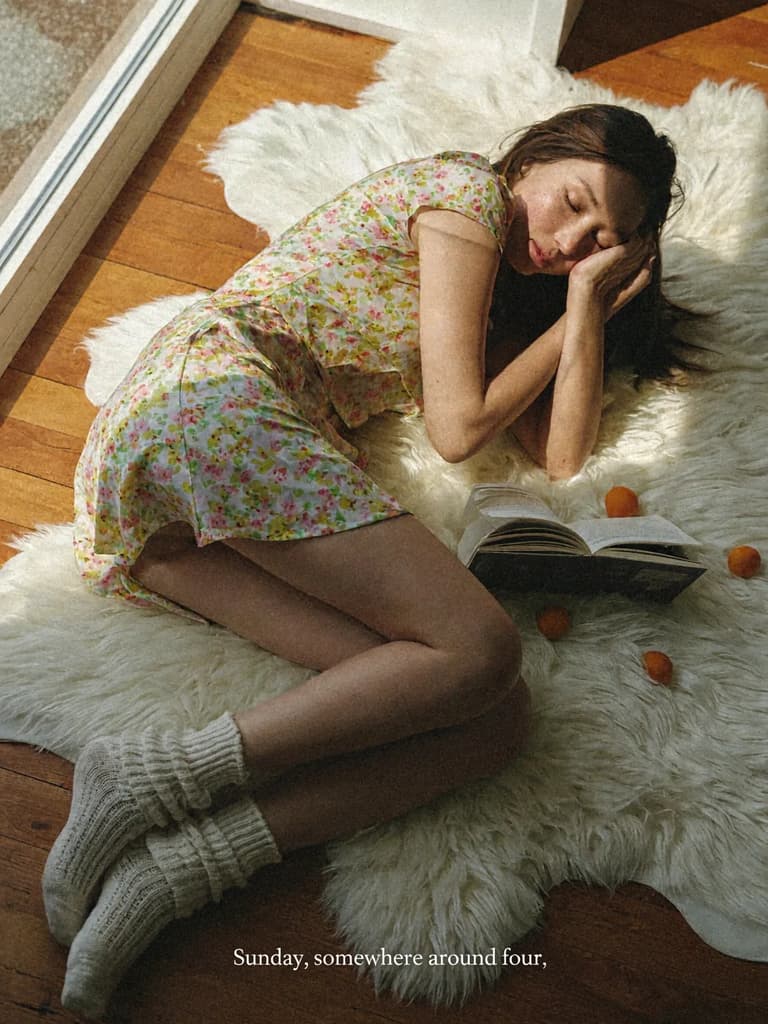
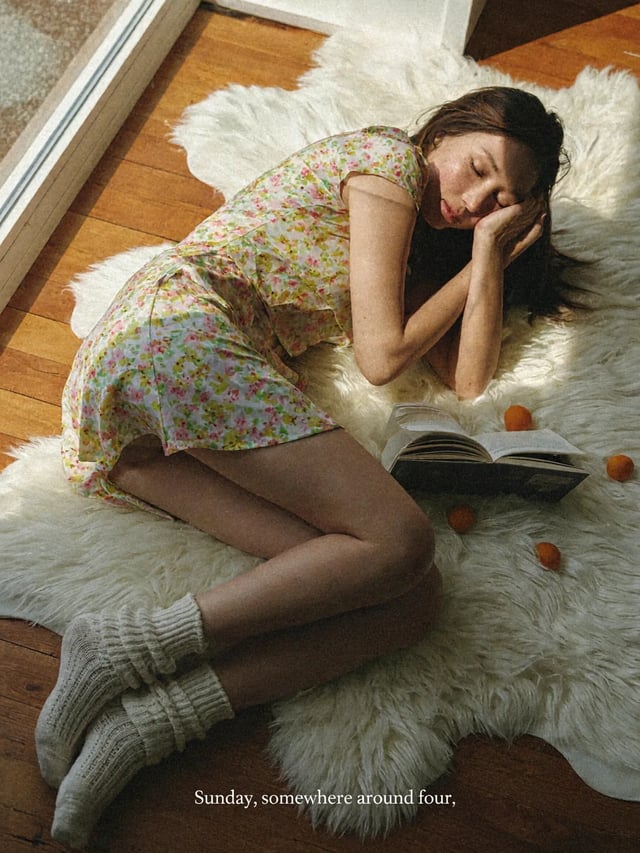
A casual phone photo of a woman in her mid-twenties lying back on a white sheepskin rug on a wooden floor beside a sunny window. Long dark hair spread out, one hand resting against her cheek, eyes half closed. She wears a short-sleeved floral summer dress and slouchy cream knit socks. Open paperback books and a few ripe apricots lie on the rug around her. Warm, hard late-afternoon sunlight falls across her in a sharp diagonal, with deep soft shadows. Shot from slightly above, natural skin texture with freckles, light film grain, faded warm colors. A small white serif caption along the bottom edge reads: "Sunday, somewhere around four."
H3 Image vs P-H3-Image examples
 H3 Image
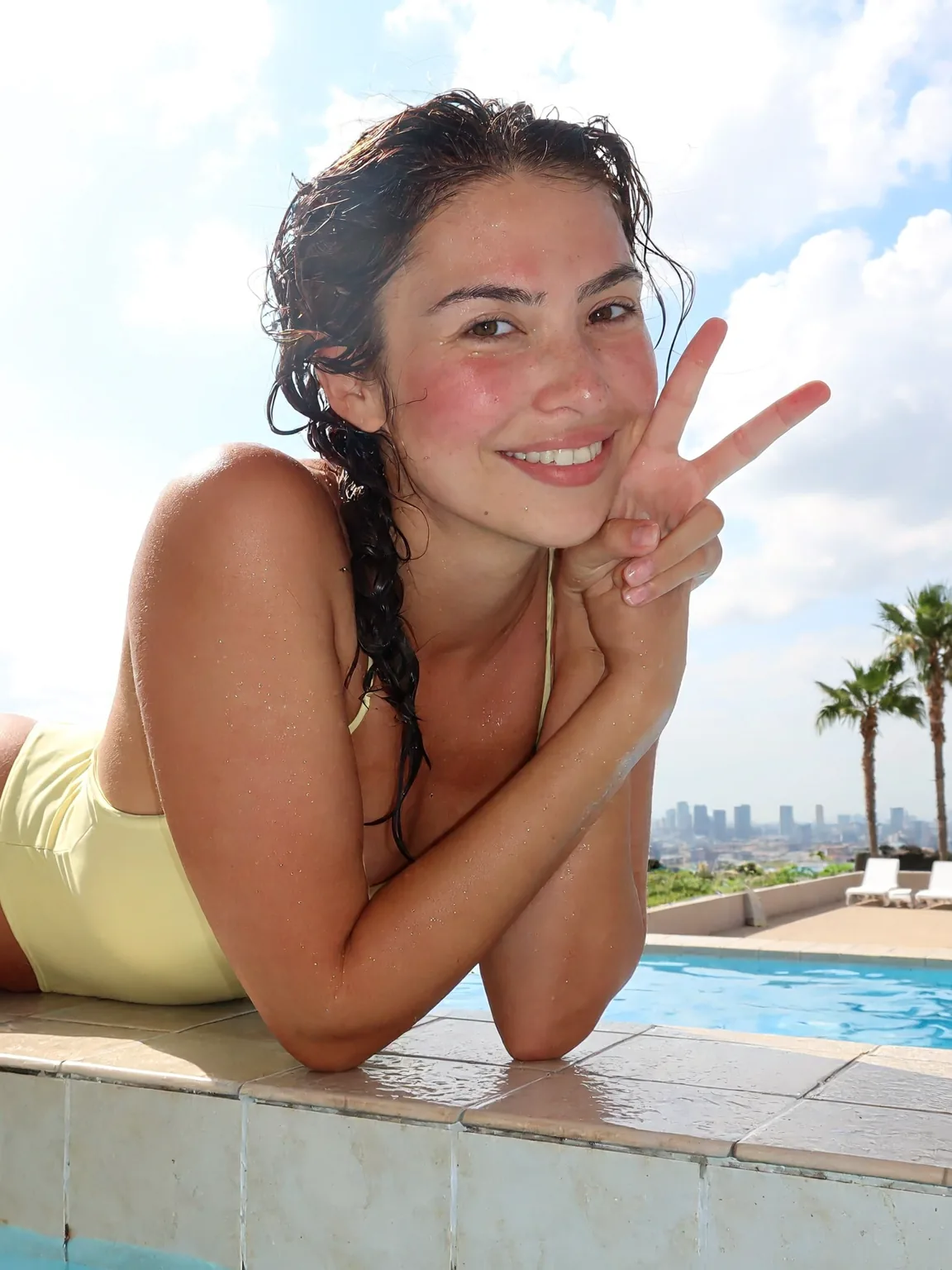
A bright phone snapshot of a smiling woman in her mid-twenties leaning on the tiled edge of a rooftop swimming pool, arms folded on the edge, one hand making a peace sign near her face. Wet dark hair in a loose braid over one shoulder, a pale yellow one-piece swimsuit, water droplets on her skin and a light sunburn blush on her cheeks. Behind her: blue pool water, white sun loungers, two palm trees and a hazy city skyline under a cloudy summer sky. Midday sun, slightly overexposed highlights, eye-level framing a little off center, natural skin texture, casual and happy.
 H3 Image
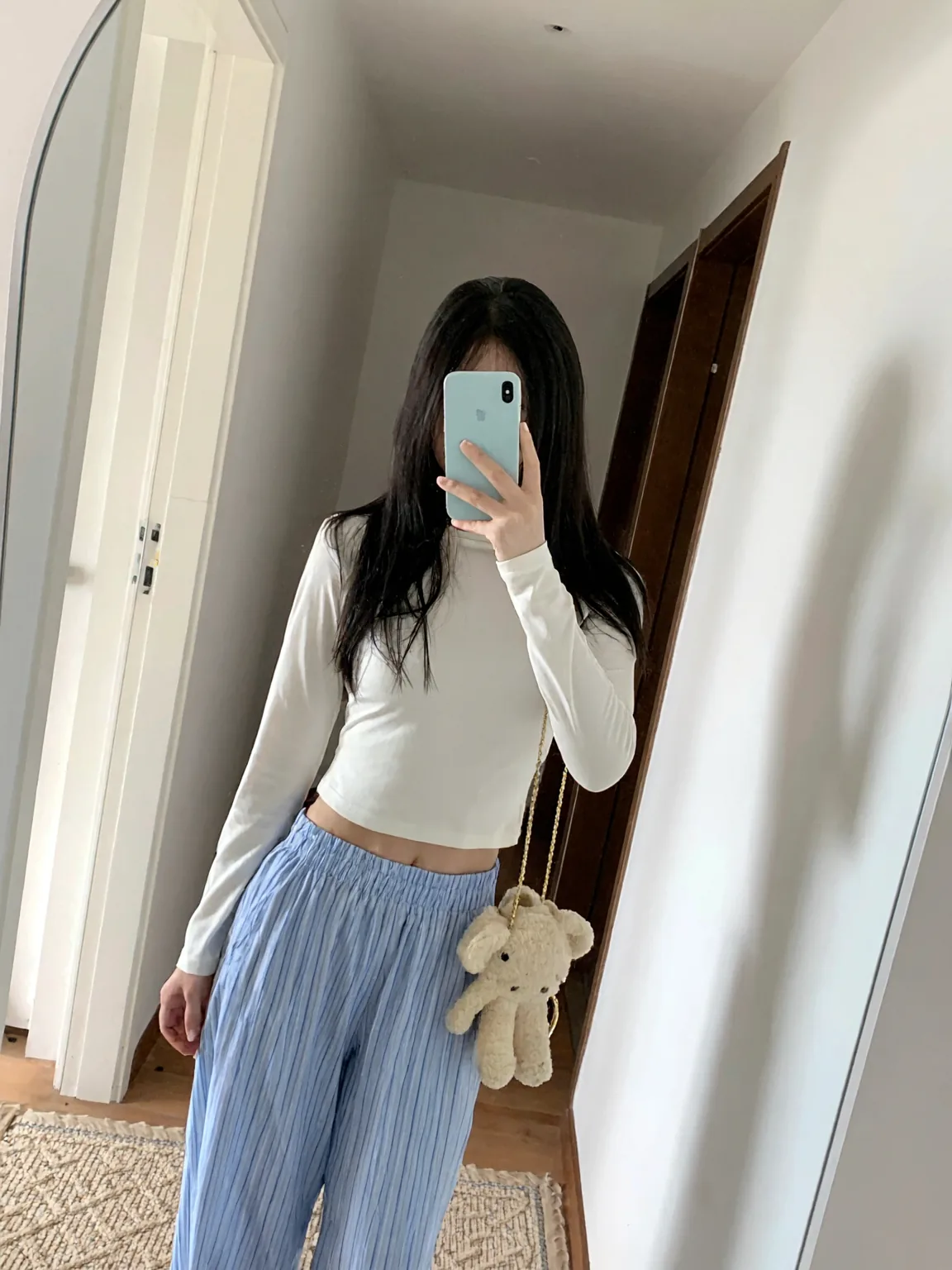
A mirror selfie in a minimal apartment hallway: a young woman in her twenties holds a pale blue phone in front of her face so her face is hidden, long straight black hair falling past her shoulders. She wears a fitted white long-sleeve cropped top, light blue striped pajama pants and a small cream teddy-bear bag on a thin gold chain over her shoulder. Soft daylight from a doorway on the left, a white wall and a dark wooden door frame behind her. Slightly tilted vertical framing, phone camera look, true-to-life colors.
 H3 Image
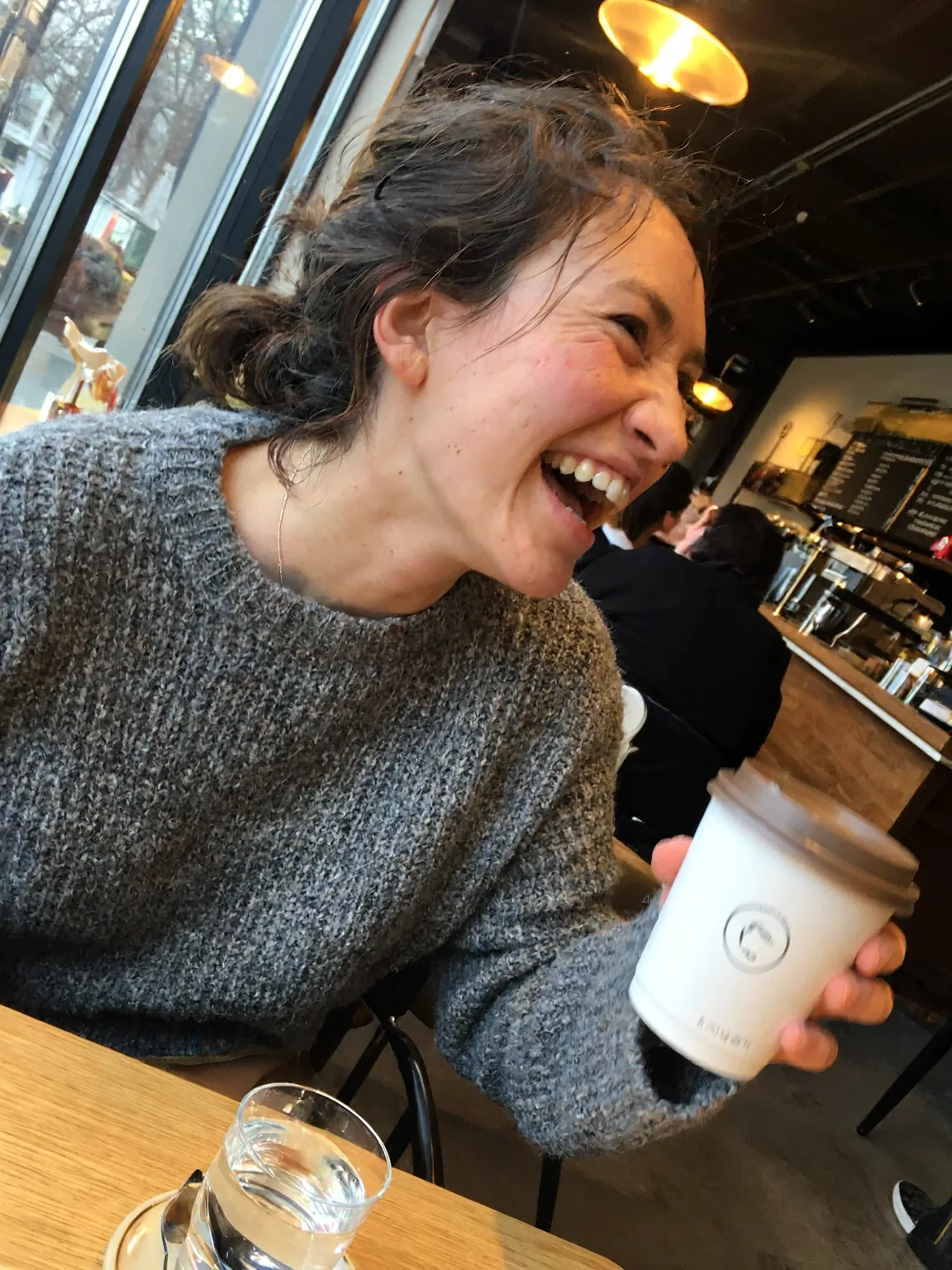
An ordinary phone photo taken by a friend across the table in a busy cafe: a woman in her late twenties with messy dark hair and a gray knit sweater, mid-laugh, holding a paper coffee cup. Eye level, slightly tilted framing, her face a little off center. Mixed light from the window and warm ceiling bulbs, a bit of motion blur on her hand, other customers soft in the background. No studio lighting, no retouching, visible skin texture.
 H3 Image
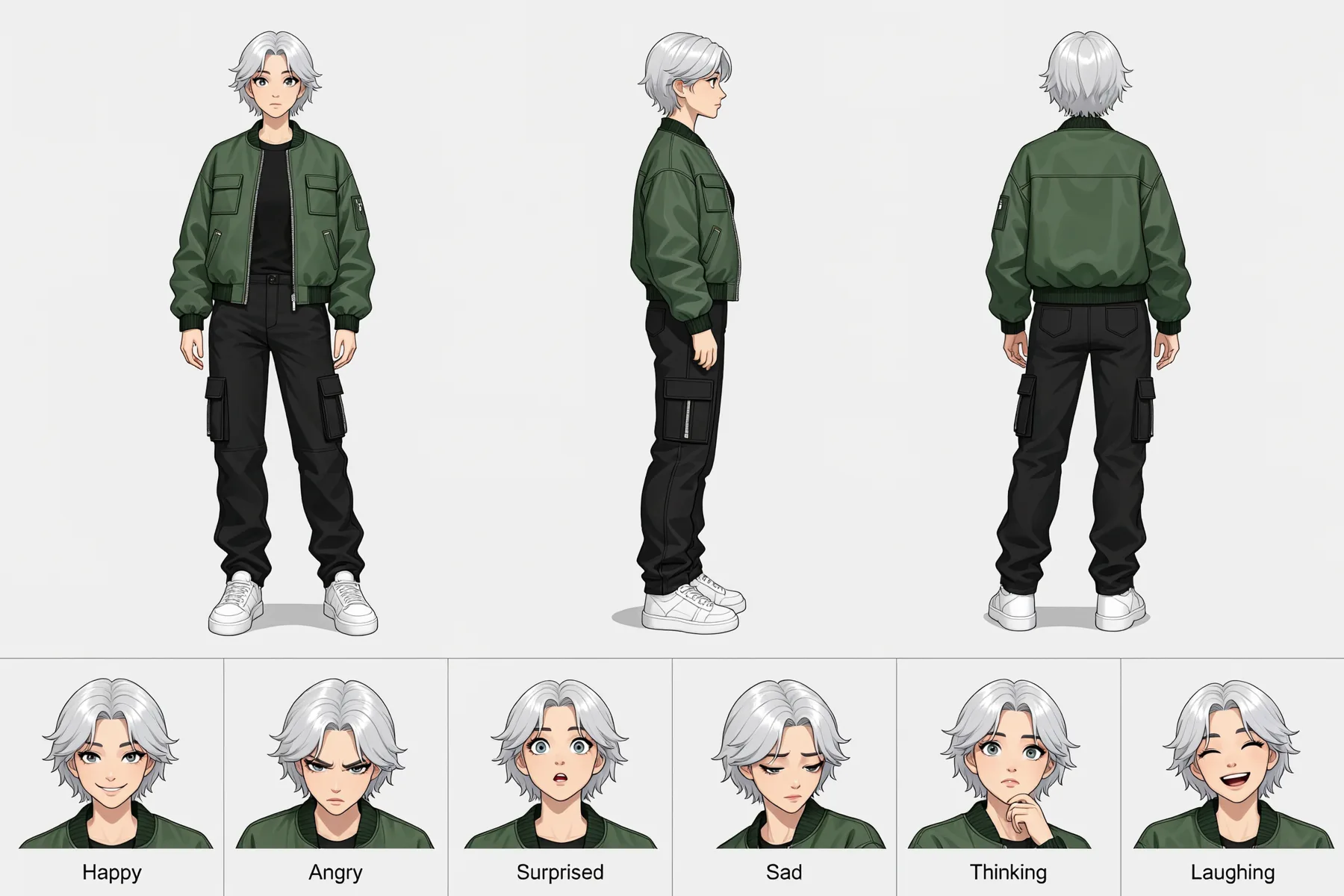
Character reference sheet of one young woman with short silver hair, a green bomber jacket, black cargo pants and white sneakers. Top row: full-body front view, side view and back view in the same neutral pose, evenly spaced on a plain light gray background. Bottom row: six head-and-shoulder close-ups with different expressions, labeled Happy, Angry, Surprised, Sad, Thinking and Laughing. Clean digital illustration, flat even lighting, the same proportions and colors in every view.
 H3 Image
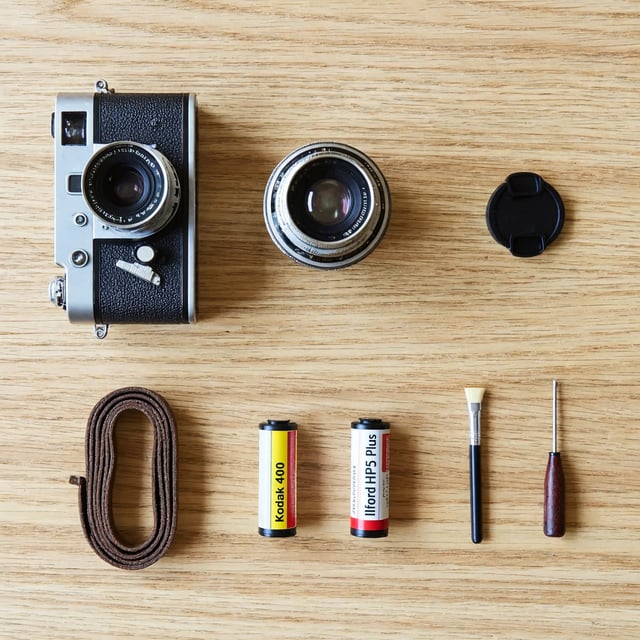
Knolling photo shot from directly above: a vintage film camera taken apart into its body, lens, lens cap, strap, two film rolls, a cleaning brush and a small screwdriver, all laid out at right angles with even gaps on a pale oak table. Soft daylight from a window on the left, gentle shadows, every object fully visible and none overlapping. Sharp focus from edge to edge, natural colors.
What is P-H3-Image, and is it the same as H3 Image?
P-H3-Image is not MiniMax's H3 Image. Pruna AI released it on November 3, 2026, as an open image model fine-tuned from MiniMax H3, the open-weight video model MiniMax published in July. MiniMax released its own H3 Image on November 11. Same base model, different teams, different weights.
The names collide because P-H3-Image came first: for a week it was the only H3-based image model you could download, so its Hugging Face page, its ComfyUI files and Reddit threads about running it filled the results for "h3 image". P-H3, PH3 image and Pruna H3 Image all mean Pruna's model. The #H3Image pictures early-access testers posted on X came from MiniMax's H3 Image.
MiniMax H3 Image vs P-H3-Image, spec by spec
From both models' cards, read on November 11, 2026. The last row is our measured wait at 2K, queue included, with the two models on different hosting services.
| H3 ImageMiniMaxTry H3 Image | P-H3-ImagePruna AI | |
|---|---|---|
| Released | November 11, 2026 | November 3, 2026 |
| Built on | MiniMax H3 | MiniMax H3, fine-tuned |
| Sampling steps | 6, no guidance scale | 8, no guidance scale |
| Largest picture | About 16 MP at every aspect ratio | 8 MP for text to image, 4 or 8 MP for edits |
| Reference images | Up to 16 in one edit | See its model card |
| To run it yourself | About 69 GB of weights plus a 67 GB text encoder | About 21 GB of graphics memory in 4-bit; about 83 GB in full at 8 MP |
| License | MiniMax-H3-Image Community License; excludes the US, EU, UK and South Korea | Custom license ("other" on Hugging Face); read its card |
| Where to use it | Hailuo app, MiniMax API, open weights and this site | Open weights on Hugging Face, ComfyUI and hosted APIs |
| Our wait at 2K | 15 to 24 seconds | 17 to 63 seconds |
Five text-to-image tests, side by side
Each prompt ran once per model on November 11, 2026, at 2K, and we kept the first picture. Times include the queue and come from two different hosting services, so they reflect the host as much as the model.
Knolling photo shot from directly above: a vintage film camera taken apart into its body, lens, lens cap, strap, two film rolls, a cleaning brush and a small screwdriver, all laid out at right angles with even gaps on a pale oak table. Soft daylight from a window on the left, gentle shadows, every object fully visible and none overlapping. Sharp focus from edge to edge, natural colors.
Count the objects: the prompt lists eight, and each should appear once with even gaps.
A casual phone photo of a woman in her mid-twenties lying back on a white sheepskin rug on a wooden floor beside a sunny window. Long dark hair spread out, one hand resting against her cheek, eyes half closed. She wears a short-sleeved floral summer dress and slouchy cream knit socks. Open paperback books and a few ripe apricots lie on the rug around her. Warm, hard late-afternoon sunlight falls across her in a sharp diagonal, with deep soft shadows. Shot from slightly above, natural skin texture with freckles, light film grain, faded warm colors. A small white serif caption along the bottom edge reads: "Sunday, somewhere around four."
Read the caption along the bottom: the prompt ends it with a period.
A bright phone snapshot of a smiling woman in her mid-twenties leaning on the tiled edge of a rooftop swimming pool, arms folded on the edge, one hand making a peace sign near her face. Wet dark hair in a loose braid over one shoulder, a pale yellow one-piece swimsuit, water droplets on her skin and a light sunburn blush on her cheeks. Behind her: blue pool water, white sun loungers, two palm trees and a hazy city skyline under a cloudy summer sky. Midday sun, slightly overexposed highlights, eye-level framing a little off center, natural skin texture, casual and happy.
Check the details the prompt lists: wet braid, yellow swimsuit, peace sign, palm trees and the city skyline.
An ordinary phone photo taken by a friend across the table in a busy cafe: a woman in her late twenties with messy dark hair and a gray knit sweater, mid-laugh, holding a paper coffee cup. Eye level, slightly tilted framing, her face a little off center. Mixed light from the window and warm ceiling bulbs, a bit of motion blur on her hand, other customers soft in the background. No studio lighting, no retouching, visible skin texture.
Look for what makes a phone photo believable: mixed window and bulb light, a little blur, a busy background.
Character reference sheet of one young woman with short silver hair, a green bomber jacket, black cargo pants and white sneakers. Top row: full-body front view, side view and back view in the same neutral pose, evenly spaced on a plain light gray background. Bottom row: six head-and-shoulder close-ups with different expressions, labeled Happy, Angry, Surprised, Sad, Thinking and Laughing. Clean digital illustration, flat even lighting, the same proportions and colors in every view.
Check the six labels and whether the jacket, pants and sneakers match across the three views.
- Closer to the prompt
H3 Image
MiniMax · 18 sEvery listed object appears once with even gaps, and the film rolls carry readable labels. The one miss: the camera body kept a lens on as well as the loose one.
P-H3-Image
Pruna AI · 33 sBoth film rolls are missing, two extra lens-like parts appear instead, and the strap is still attached to the camera.
H3 Image
MiniMax · 17 sA convincing casual film-style photo. The caption came out with a comma where the prompt had a period.
P-H3-Image
Pruna AI · 17 sJust as photo-like, and the caption is exact, period included. She has her legs raised up toward the window, which the prompt did not ask for.
H3 Image
MiniMax · 15 sEverything the prompt lists is there, framed close, with natural skin texture.
P-H3-Image
Pruna AI · 32 sEverything is there too, with more of the pool in frame and equally natural skin.
H3 Image
MiniMax · 19 sCaught mid-laugh, leaning in, with mixed light: it reads as a friend's snapshot.
P-H3-Image
Pruna AI · 29 sFaces the camera while she laughs, with the same mixed light and soft background. Roughly a tie.
H3 Image
MiniMax · 15 sAll six labels spelled right and the outfit consistent; the cleaner, more evenly laid out sheet.
P-H3-Image
Pruna AI · 39 sAll six labels right and the outfit consistent too; the figures stand in an A-pose, in a slightly heavier style.
Two edits: restyling a photo and combining two pictures
Same input pictures from the tests above, same instruction. H3 Image's prompt names them Image 1 and Image 2; for P-H3-Image we wrote <Picture 1> and <Picture 2>, the syntax it uses.
Repaint Image 1 as a loose watercolor illustration on textured paper: soft color washes, visible brush strokes and white paper showing through, while keeping the same woman, her pose, the peace sign and the pool behind her.
Does the whole picture turn to paint, or only the edges?
The woman from Image 1, in the same gray knit sweater, stands on a quiet city street at dusk and holds the silver vintage film camera from Image 2 up to her eye, about to take a photo. Warm shop-window light on her face, blue evening sky, soft background. Keep her face, hair and sweater the same as in Image 1 and the camera the same as in Image 2.
Compare her face with Image 1, and check whether she raises the camera to her eye.
Image 1
Input- Closer to the prompt
H3 Image
MiniMax · 20 sThe whole picture becomes loose watercolor on paper, while the pose, braid, peace sign and pool stay in place.
P-H3-Image
Pruna AI · 63 sMostly still the photo: only the edges soften into paint and white paper, so it reads as a lightly filtered photo.
Image 1
InputImage 2
InputH3 Image
MiniMax · 24 sThe sweater and the silver camera carried over, and she raises the camera to her eye as asked, but her face came out older than in Image 1.
P-H3-Image
Pruna AI · 41 sThe sweater and camera carried over and her face stays closer to Image 1, younger and smiling, but she holds the camera beside her face, not up to her eye.
Running H3 Image or P-H3-Image yourself: hardware and license
P-H3-Image fits smaller hardware. Pruna's 4-bit ComfyUI files run in about 21 GB of graphics memory; the full model needs about 83 GB for an 8-megapixel picture (101 GB with its prompt upsampler), so one NVIDIA H200 or B200, or an 80 GB card with offloading. Hugging Face lists its license as "other", so read the terms on its model card before you use it in a product.
MiniMax H3 Image has 33.1 billion parameters: about 69 GB of weights plus MiniMax H3's 67 GB text encoder. MiniMax lists no minimum graphics card and names the NVIDIA H200, the RTX PRO 6000 Blackwell and the AMD Instinct MI350X for serving it. Its community license is royalty-free where it applies but excludes the United States, the European Union, the United Kingdom and South Korea, outputs included. A business with yearly revenue above 1 million US dollars, or anyone offering the model to others as a hosted service, needs MiniMax's written permission, and neither the model nor its outputs may be used to improve other AI models.
H3 Image or P-H3-Image: which should you use?
Choose P-H3-Image if you want an H3-based image model on your own machine, especially in ComfyUI, and your graphics card has room for its 4-bit files; hosted APIs that offer it are another way in. In our runs it kept up on the portraits and the cafe photo, and it copied a caption exactly.
Choose MiniMax H3 Image if you would rather not run anything yourself, or if the picture depends on following a detailed list: it laid out every object in the knolling shot and turned the whole photo into watercolor, where P-H3-Image dropped objects and barely restyled. It also makes larger pictures, up to about 16 megapixels, and takes up to 16 reference images per edit. You can use it in MiniMax's Hailuo app, through the MiniMax API, or in this site's generator.
Seven prompts with one run each is a small sample, so test the kind of picture you actually need.
H3 Image vs P-H3-Image questions
No. P-H3-Image is Pruna AI's model, fine-tuned from MiniMax H3's open weights and released on November 3, 2026. MiniMax's own image model is H3 Image, released on November 11. They share a base model, not a team or weights.
On our seven prompts, H3 Image did clearly better on the knolling layout and the watercolor restyle. The portraits, the cafe photo and the character sheet were about even, P-H3-Image copied a caption's punctuation exactly where H3 Image did not, and the two-picture edit was mixed.
No. This site makes pictures with MiniMax H3 Image. For P-H3-Image, download it from its Hugging Face page, load Pruna's ComfyUI files, or use a hosted API that offers it.
Yes. A new account here gets 10 free credits, enough for five 1K H3 Image pictures; free pictures carry a watermark until you buy a plan or credit pack.
No. h3image.com is an independent site, not run by or affiliated with MiniMax, Hailuo or Pruna AI. MiniMax's own places for H3 Image are its Hugging Face page, the MiniMax API platform and the Hailuo app.
More on H3 Image
Text to image
Paste any prompt from the tests above and run it on H3 Image.
Run H3 Image Locally: Download Sizes, VRAM and ComfyUI Setup
Run H3 Image locally: MiniMax's official download and the Hugging Face GGUF, FP8 and Mac MLX versions with their sizes, plus VRAM, ComfyUI and license notes.
H3 Image home
What MiniMax H3 Image is, prompts in the #H3Image style, and how to turn a picture into an H3 video.
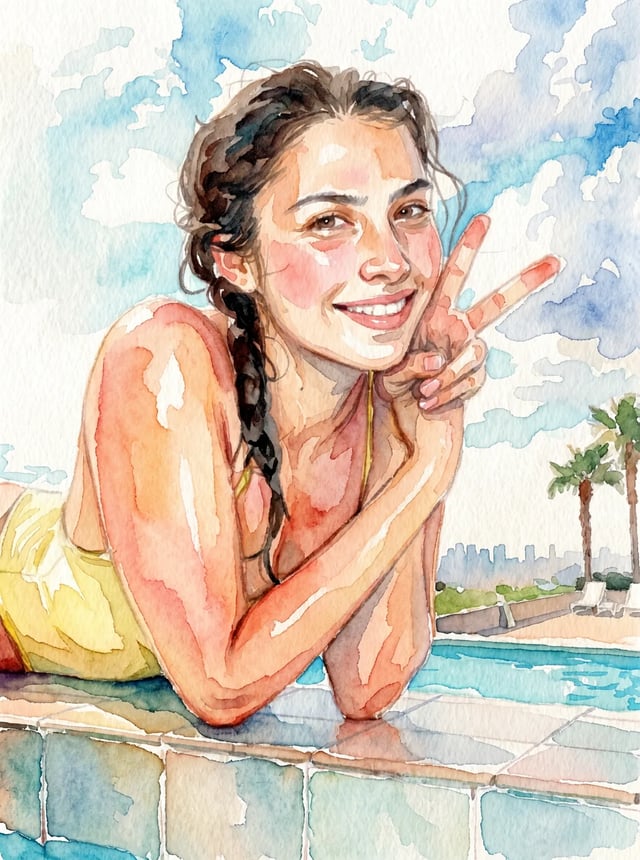
Image to image
Restyle a photo or combine several, with up to 16 reference images.